

Poll Results
Please login to vote and see the results.
Participate in Poll, Choose Your Answer.
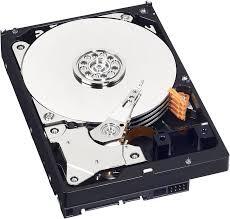
A desktop PC hard drive is a storage device used to save and retrieve digital data such as operating systems, software, documents, photos, and videos. It is a crucial component of any desktop computer, ensuring that your files are محفوظ ...Read more
A desktop PC hard drive is a storage device used to save and retrieve digital data such as operating systems, software, documents, photos, and videos. It is a crucial component of any desktop computer, ensuring that your files are محفوظ even when the system is turned off. There are two main types of hard drives: HDD (Hard Disk Drive) and SSD (Solid State Drive). HDDs use spinning disks to store data, while SSDs rely on flash memory, making them faster and more reliable.
What are the Types of Desktop PC Hard Drives?
Desktop PC hard drives come in different forms based on technology and performance. HDDs are traditional and more affordable, offering large storage capacities. SSDs, on the other hand, provide faster data access, quicker boot times, and better durability. There are also hybrid drives (SSHDs) that combine both technologies. Choosing between them depends on your needs—budget users may prefer HDDs, while gamers and professionals often choose SSDs.
How to Choose the Right Hard Drive?
When selecting a desktop PC hard drive, consider storage capacity, speed, and budget. If you need large storage for media files, a 1TB or 2TB HDD is a good option. For faster performance, a 256GB or 512GB SSD works well. Many users combine both: an SSD for the operating system and an HDD for storage. Also, check compatibility with your motherboard before purchasing.
Why is a Good Hard Drive Important?
A reliable hard drive improves overall system performance, reduces loading times, and ensures data safety. Investing in a quality desktop PC hard drive enhances productivity and provides a smoother computing experience.
Read less







One strong point is how you connect the technical details to real user needs—like faster boot times or storing large media files—which makes the content more relatable. A small improvement would be to clarify or translate the word “محفوظ” (saved/secure) to keep the language consistent throughout. YoRead more
One strong point is how you connect the technical details to real user needs—like faster boot times or storing large media files—which makes the content more relatable.
A small improvement would be to clarify or translate the word “محفوظ” (saved/secure) to keep the language consistent throughout. You could also briefly mention newer SSD types like NVMe for even faster performance, as that’s becoming a common choice today.
Overall, it’s well-structured, easy to understand, and gives readers helpful guidance for making a decision.
See less