Hello,

Sign up to join our community!

Welcome Back,

Please sign in to your account!

Forgot Password,

Lost your password? Please enter your email address. You will receive a link and will create a new password via email.


You must login to add post.

Please briefly explain why you feel this question should be reported.

Please briefly explain why you feel this answer should be reported.

Please briefly explain why you feel this user should be reported.

Lets Inspire Latest Questions

Poll Results

Please login to vote and see the results.

Participate in Poll, Choose Your Answer.

What is a Transceiver Module? A transceiver module is an electronic device that can both transmit and receive signals. It combines the functions of a transmitter and a receiver into a single unit, making it a critical ...Read more

What is a Transceiver Module?

A transceiver module is an electronic device that can both transmit and receive signals. It combines the functions of a transmitter and a receiver into a single unit, making it a critical component in modern communication systems. These modules are widely used in networking, telecommunications, and data transfer applications, including fiber optics and wireless communications.

Types of Transceiver Modules

Transceiver modules come in various types depending on the technology and application:

  • Optical Transceivers: Used in fiber optic networks, they convert electrical signals to optical signals and vice versa. Examples include SFP (Small Form-factor Pluggable), SFP+, QSFP, and CFP modules.
  • Wireless Transceivers: Found in Wi-Fi, Bluetooth, and cellular devices, these modules handle radio frequency (RF) signals for wireless communication.
  • Copper Transceivers: Operate over traditional Ethernet cables, supporting different speeds such as 1G, 10G, or higher.

Key Features of Transceiver Modules

  • Bidirectional Communication: Allows simultaneous sending and receiving of data.
  • High-Speed Data Transfer: Supports efficient and fast data transmission, crucial for modern networks.
  • Hot-Swappable: Many modules, especially SFP types, can be replaced without shutting down the system.
  • Compatibility: Designed to match specific standards (e.g., IEEE, optical wavelengths) for smooth integration into networks.

Applications of Transceiver Modules

Transceiver modules are integral to:

  • Data Centers: Connecting servers, switches, and storage devices.
  • Telecommunication Networks: Enabling long-distance high-speed data transmission.
  • Industrial Networking: Supporting reliable communication in automated systems.

Conclusion

In summary, a transceiver module is a versatile and essential technology that enables efficient, high-speed, and reliable communication across wired and wireless networks. Choosing the right module is vital for optimizing network performance and maintaining connectivity in modern digital infrastructure.

Read less
  1. A transceiver module is an electronic device that can both transmit and receive signals. It combines the functions of a transmitter and a receiver into a single unit, making it a critical component in modern communication systems. These modules are widely used in networking, telecommunications, andRead more

    A transceiver module is an electronic device that can both transmit and receive signals. It combines the functions of a transmitter and a receiver into a single unit, making it a critical component in modern communication systems. These modules are widely used in networking, telecommunications, and data transfer applications, including fiber optics and wireless communications.

    See less
0
0
Be the first one react

Poll Results

Please login to vote and see the results.

Participate in Poll, Choose Your Answer.

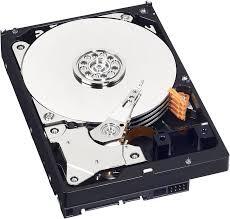
A desktop PC hard drive is a storage device used to save and retrieve digital data such as operating systems, software, documents, photos, and videos. It is a crucial component of any desktop computer, ensuring that your files are محفوظ ...Read more

A desktop PC hard drive is a storage device used to save and retrieve digital data such as operating systems, software, documents, photos, and videos. It is a crucial component of any desktop computer, ensuring that your files are محفوظ even when the system is turned off. There are two main types of hard drives: HDD (Hard Disk Drive) and SSD (Solid State Drive). HDDs use spinning disks to store data, while SSDs rely on flash memory, making them faster and more reliable.

What are the Types of Desktop PC Hard Drives?

Desktop PC hard drives come in different forms based on technology and performance. HDDs are traditional and more affordable, offering large storage capacities. SSDs, on the other hand, provide faster data access, quicker boot times, and better durability. There are also hybrid drives (SSHDs) that combine both technologies. Choosing between them depends on your needs—budget users may prefer HDDs, while gamers and professionals often choose SSDs.

How to Choose the Right Hard Drive?

When selecting a desktop PC hard drive, consider storage capacity, speed, and budget. If you need large storage for media files, a 1TB or 2TB HDD is a good option. For faster performance, a 256GB or 512GB SSD works well. Many users combine both: an SSD for the operating system and an HDD for storage. Also, check compatibility with your motherboard before purchasing.

Why is a Good Hard Drive Important?

A reliable hard drive improves overall system performance, reduces loading times, and ensures data safety. Investing in a quality desktop PC hard drive enhances productivity and provides a smoother computing experience.

Read less
  1. Types of Desktop PC Hard Drives:There are mainly three types of desktop PC hard drives based on technology and performance: 1. HDD (Hard Disk Drive): Traditional hard drives that use spinning disks to store data. HDDs are known for their larger storage capacities and affordability. 2. SSD (Solid StaRead more

    Types of Desktop PC Hard Drives:

    There are mainly three types of desktop PC hard drives based on technology and performance:

    1. HDD (Hard Disk Drive): Traditional hard drives that use spinning disks to store data. HDDs are known for their larger storage capacities and affordability.

    2. SSD (Solid State Drive): Hard drives that rely on flash memory instead of spinning disks. SSDs offer faster data access, quicker boot times, and better durability.

    3. Hybrid Drives (SSHDs): These drives combine the technology of HDDs and SSDs, providing a balance between storage capacity and speed.

    How to Choose the Right Hard Drive:

    When selecting a desktop PC hard drive, consider the following factors:

    Storage Capacity: Choose based on your storage needs. HDDs offer larger capacities, while SSDs provide faster performance with smaller capacities.

    Speed: SSDs are generally faster than HDDs, leading to quicker system operations.

    Budget: HDDs are more affordable per gigabyte of storage compared to SSDs. Consider your budget when deciding.

    Why a Good Hard Drive is Important:

    A reliable hard drive is crucial for the following reasons:

    Improved Performance: A good hard drive enhances overall system performance and reduces loading times, especially during boot-up and data access.

    Data Safety: Ensures that your files are securely stored and easily accessible, reducing the risk of data

    See less
0
0
Be the first one react

Latest News & Updates

Lets Inspire Latest Articles

Spice Up Your Kitchen: 10 Fun and Easy Cooking Ideas to Try This Week

Spice Up Your Kitchen: 10 Fun and Easy Cooking Ideas to Try This Week

Let’s face it—sometimes the question “What’s for dinner?” feels more like a riddle than a plan. If you’re tired of the same old recipes or looking to reignite your love for cooking, you’re in the right place. Here are 10 ...

Shoot Like a Pro: 10 Photography Tips That Instantly Level Up Your Photos

Shoot Like a Pro: 10 Photography Tips That Instantly Level Up Your Photos

Photography isn’t just about having a fancy camera — it’s about seeing the world differently. Whether you’re using a DSLR, a mirrorless camera, or just your phone, learning a few solid tips can transform your snapshots into striking, share-worthy images. ...

Behind the Popcorn: What It’s Really Like to Be a Movie Critic

Behind the Popcorn: What It’s Really Like to Be a Movie Critic

Ever watched a movie and thought, “I could totally write about this”? Congratulations — you’re halfway to being a movie critic! But beyond rating movies from 1 to 5 stars and knowing who directed Inception, movie criticism is an art ...

Gear Up: The Ultimate Guide to Choosing the Right Sports Gear

Gear Up: The Ultimate Guide to Choosing the Right Sports Gear

Whether you’re a weekend warrior, a school athlete, or just getting started with fitness, the right sports gear makes a huge difference. It can boost performance, prevent injuries, and—let’s be honest—make you look awesome while doing it. This guide breaks ...

Home Décor Bliss: Transform Your Space with Style and Soul

Home Décor Bliss: Transform Your Space with Style and Soul

Whether you’re moving into a new house or refreshing your current space, home décor is more than just arranging furniture and hanging art. It’s about creating an environment that reflects your personality, brings comfort, and makes everyday living more beautiful. ...

Explore Our Blog